Operations software for small hotels

Run rooms, revenue, and guests like a modern property—without enterprise bloat

Philoxeniais a focused workspace for boutique hotels, B&Bs, and guesthouses: a live calendar, command search, guest histories, reporting, and team access—scoped per property so everyone stays aligned.

Spreadsheets are not a front desk

When availability, guest details, and nightly revenue live in different tabs, mistakes creep in and your team wastes time reconciling. Philoxenia keeps the operational core—calendar, guests, metrics, configuration—in one calm product surface purpose-built for properties with a handful of rooms.

Product

Everything we ship today—on purpose

No vaporware: the bullets below map to the screens and behaviors already in the product, from drag-and-drop scheduling to prorated revenue ranges.

The workspace

The workspace in practice

Real screens from the product—layout, density, and tone match what you get after sign-in.

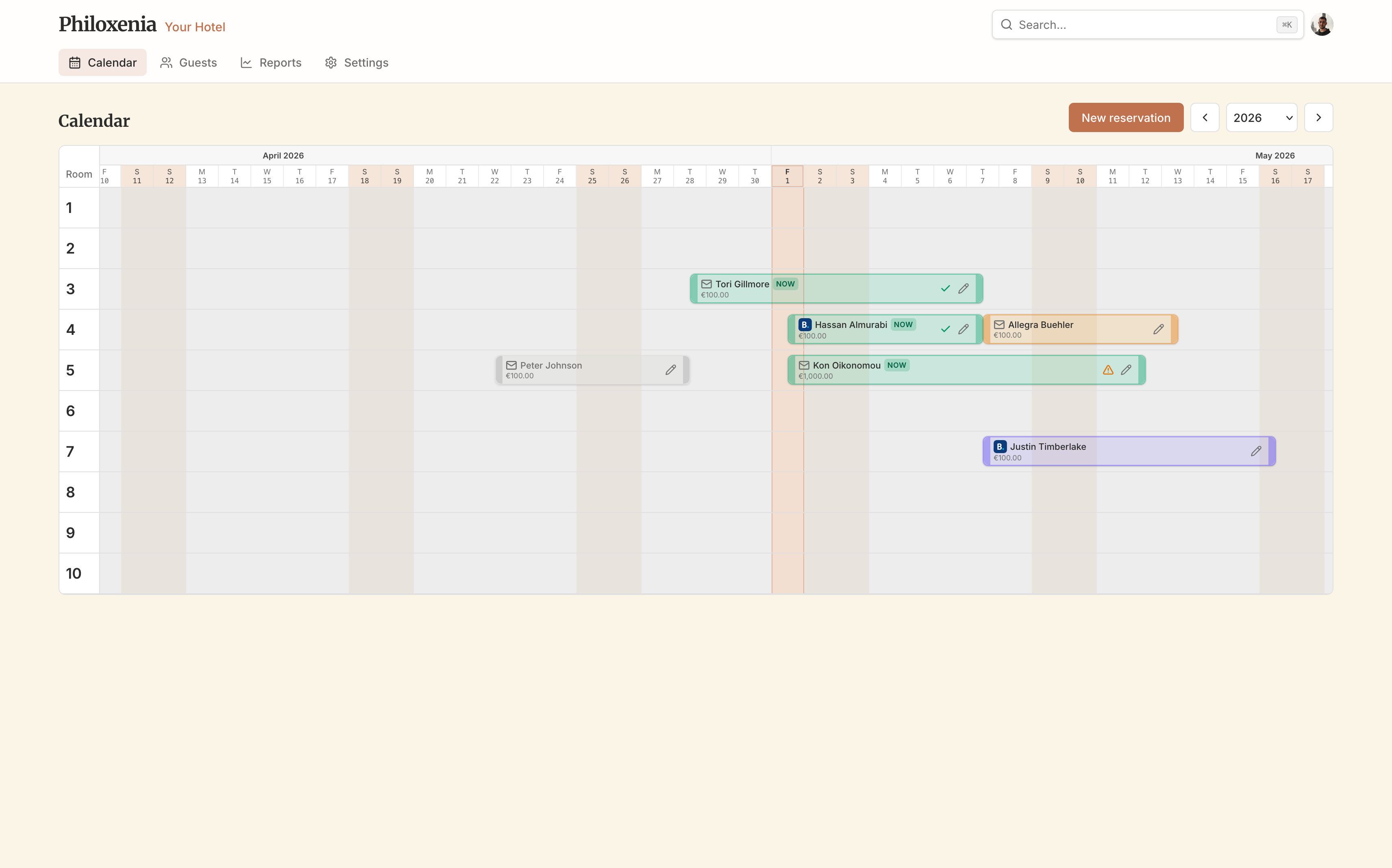
Philoxenia calendar month view with room rows and reservation bars
Month calendar — room rows, reservation bars, and the same sidebar as the live app.

Live month calendar

See every room row at a glance and adjust stays without spreadsheet gymnastics.

  • Drag reservations to move them; resize from the edges to change length.
  • Stays use exclusive check-out: nights are the half-open range from check-in through the day before check-out—matching how guests actually sleep.
  • Weekends and “today” are highlighted so the month reads quickly.
Philoxenia calendar month view with room rows and reservation bars

Command search

One palette for guests and availability—built for front-desk speed.

  • Search guests by name alongside email or phone when you have them.
  • Parse stay dates from natural text or pick a range, then see which rooms are free for those nights.
  • Keyboard-friendly flow aligned with the in-app search experience.
Philoxenia command search palette⌘K search

Guests & reservation history

A profile per guest with the paper trail in one table.

  • Filter the guest list from the Guests page; open anyone for full detail.
  • Edit contact fields on the profile; every past stay shows dates, room, nights, averages, and totals.
  • Stays stay tied to the property so context never leaks across workspaces.
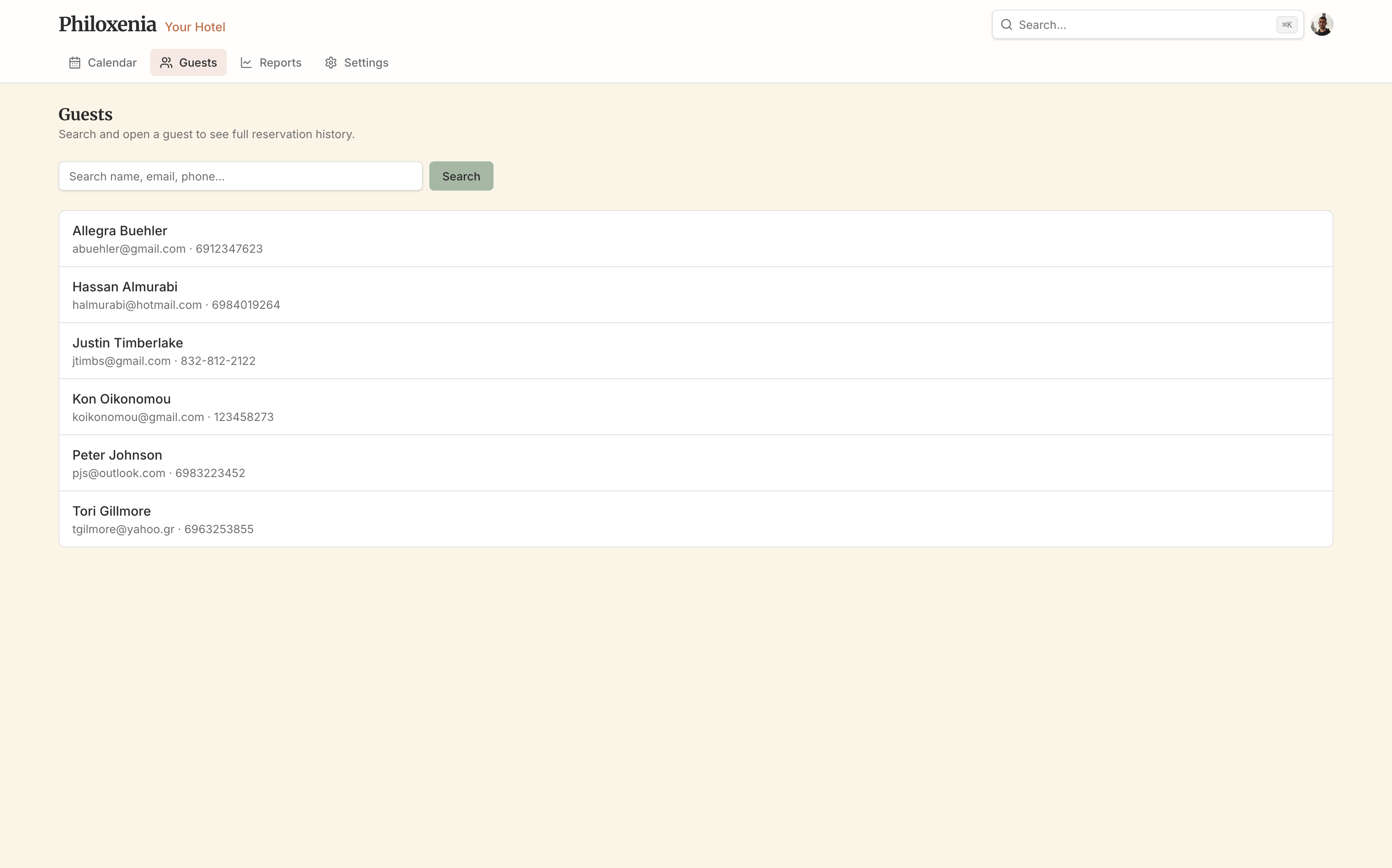
Philoxenia guests list and reservation history table
Create your first property

Per-property data boundaries · Real accounts, not demo tenants · Invite managers and front desk when you're ready

Also included

Everything else in the box

Useful from day one, without crowding the desk workflow.

Reports that match your dates
Occupancy and revenue for any range you select—not a black box.
Property, rooms, order
Everything scoped per property, with the timezone that drives “today.”
Team invites & roles
Bring a manager or front desk without sharing a single login.
Multi-property dashboard
One account, many small hotels—each with its own shell and data boundary.
Installable web app
Add Philoxenia to your home screen for a focused, app-like window.
Philoxenia guests list and reservation history table

Guests & history

Search the directory, then inspect stays with dates, room, nights, and totals in one table.

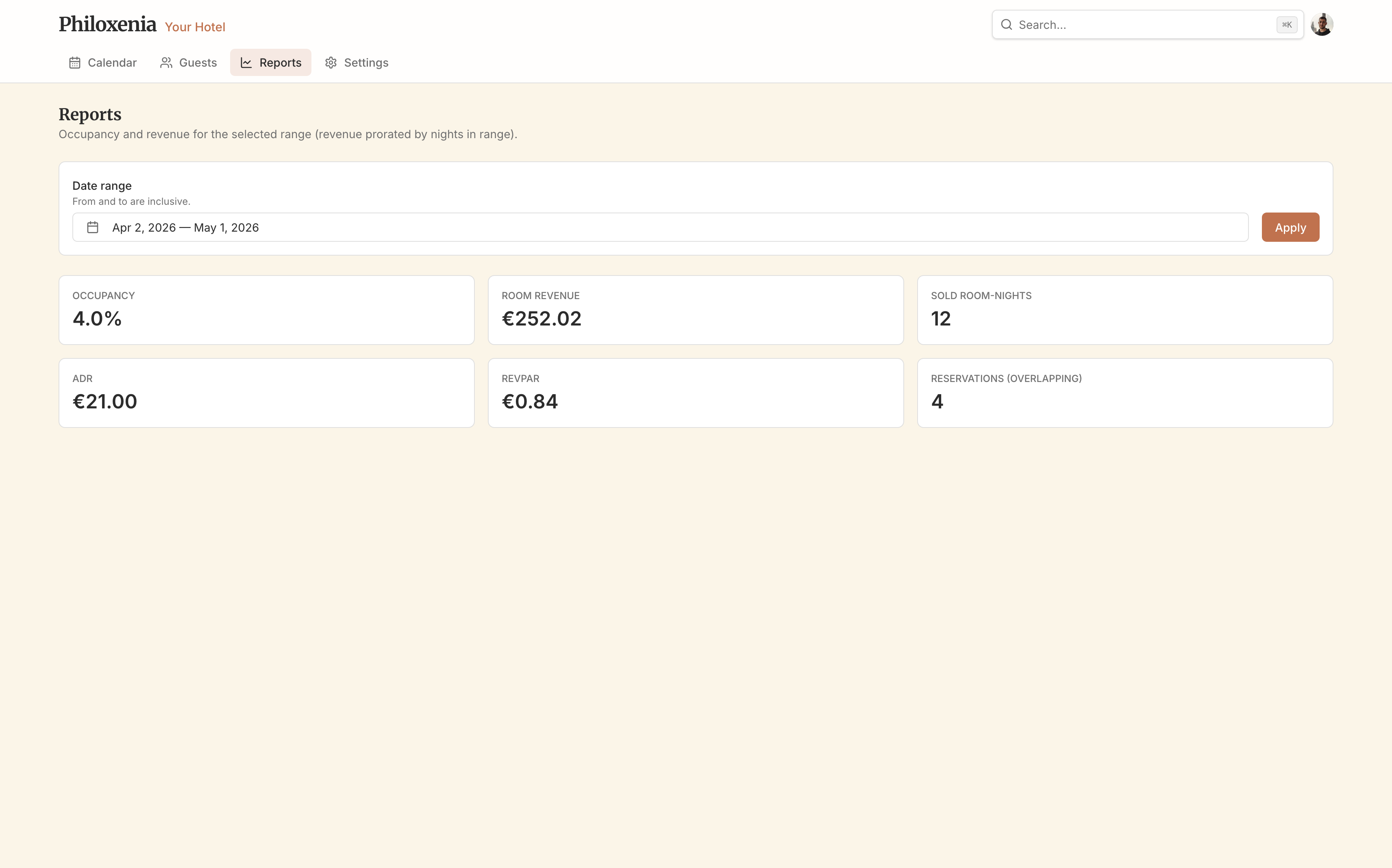
Philoxenia reports page with date range and KPI cards

Reports

Date range at the top; occupancy, revenue, ADR, RevPAR, and sold room-nights in metric tiles.

Setup

From zero to running the desk

The same path your team walks inside the app—no consultants required.

  1. Create your Philoxenia account

    Sign up with Clerk-powered authentication. You get a personal dashboard, not a demo tenant.

  2. Spin up a property

    Name it and pick the timezone that defines “today” and month boundaries. You land on the calendar ready to plan.

  3. Add rooms in Settings

    Define the inventory the calendar rows represent. Reorder when the physical layout changes.

  4. Run the operation

    Schedule on the calendar, search from the command palette, nurture guests, pull numbers in Reports, and invite teammates when you are ready.

Fit

Who it's for

Set expectations before you invest time in a trial.

Built for

  • Independent inns, micro-chains, and family-run guesthouses
  • Teams of one to a few people wearing both owner and front-desk hats
  • Operators who want clarity, not a hundred unused modules

Not trying to replace

  • Enterprise PMS suites with channel management and revenue management
  • General ledger or accounting suites—Philoxenia is operations-first
  • Marketing websites—Philoxenia is for running the stay, not publishing brochure copy

FAQ

Questions operators ask before switching

Straight answers grounded in how the product actually behaves.

What does “exclusive check-out” mean on the calendar?

The last paid night is the day before check-out. Nights are stored as [check-in, check-out) on calendar dates, so bars line up with how guests count nights and you avoid off-by-one errors.

Why does timezone matter?

Philoxenia uses your property timezone to compute “today,” month navigation, and stay boundaries. Set it in Settings so the board matches local operations.

How should I read revenue in Reports?

Pick any date range. Revenue includes only the portion of each stay’s nights that fall inside that range, so partial weeks or months stay honest.

How do invites work?

Property owners and managers generate a one-time link from Settings, choose Manager or Front desk for that invite, and share it. The recipient signs in, opens the link within fourteen days, and joins that property only. Front desk roles cannot create invites.

Is Philoxenia a full enterprise PMS?

No—and that is intentional. It is built for very small hotels that need calendar, guest, and reporting clarity without channel managers, revenue teams, or enterprise modules you will never touch.

What is the stack under the hood?

Next.js on the web, PostgreSQL for data, and Clerk for accounts. Straightforward primitives you can trust for a production workspace.

Ready to give your property a calmer system?

Create an account, add your first property, and invite your team when the calendar reflects reality—not when a vendor says you are “provisioned.”